Knod Box 0.3
Spoiler: How do these offline puzzles work?
In my previous post, I presented the idea that had been buzzing in my head for quite a while. A puzzle system you could play offline and which allows you to prove you solved it without revealing the answer...
I deliberately left out the explanation of how it works to let you discover it for yourselves. I think everyone who wanted to figure it out has had the time to do so, and I can now explain the details so everyone else can discover it too.
But before diving into the details, here is the new version of the introductory Knod Box. It's still a PNG image that you can download right now, so you can apply the explanations directly.
A Polyglot PNG
I wanted Knod Boxes to be standalone files. That they contain everything needed to play offline. I could have used a zip or tarball archive... but I found those formats too austere and not photogenic enough.
So I chose to hijack the PNG format to embed everything I needed for my game mechanics. Knod Boxes are therefore standard images that can be viewed on a website (like here) or in a directory. But at the same time, these images hide, in specific areas we'll talk about later, all the game materials for the session.
To play, I coded a Knod Pick for you. A small app that takes care of extracting the materials and lets you test answers, verify them, generate proofs of success, and check those of your friends. The app is in HTML and vanilla JS so you only need a web browser to play1.
It remains the problem of distributing my Knod Pick. I could host these files here (or on a subdomain), or even give you a link to the ZIP containing them... but the core idea was to play offline; that the Knod Box contains everything it needs...
Fortunately, one of my little PNG format hijacks allows me to turn any image into a file container... So I embedded my ZIP into my PNG. The PNG therefore contains the app that allows you to play with the PNG.
You can extract this app I hid in the PNG via the app I hid in the PNG.
The brilliant thing about this story is that the way the ZIP is incorporated into the PNG made it polyglot. For the OS (and most applications), the file is a PNG and they will display the image. But for (de)compression software, the file is a ZIP and they can extract its contents directly...
On GNU/Linux, open a command prompt and simply use unzip:
unzip <fichier>.pngWith 7-Zip, start by renaming the file, replacing the .png extension with .zip. You can then right-click and choose 7-zip / Open archive > / zip to open the file as an archive (and extract its contents). Alternatively, via command line:
7z.exe x -tzip <fichier>.zipWith cmd / PowerShell, you can use the tar command as follows:
tar -xf <fichier>.pngThere are surely many other ways to extract the Knod Pick depending on your distros and compression software, but in any case, you'll get a directory with the HTML file, its CSS stylesheet, and a few JS files to manipulate the Knod Box.
Then open index.html and you'll have a dropzone to drop the Knod Box (or another one) into. The app will take care of finding the game materials and display them. It will also validate your answers, generate success proofs, and verify your friends'.
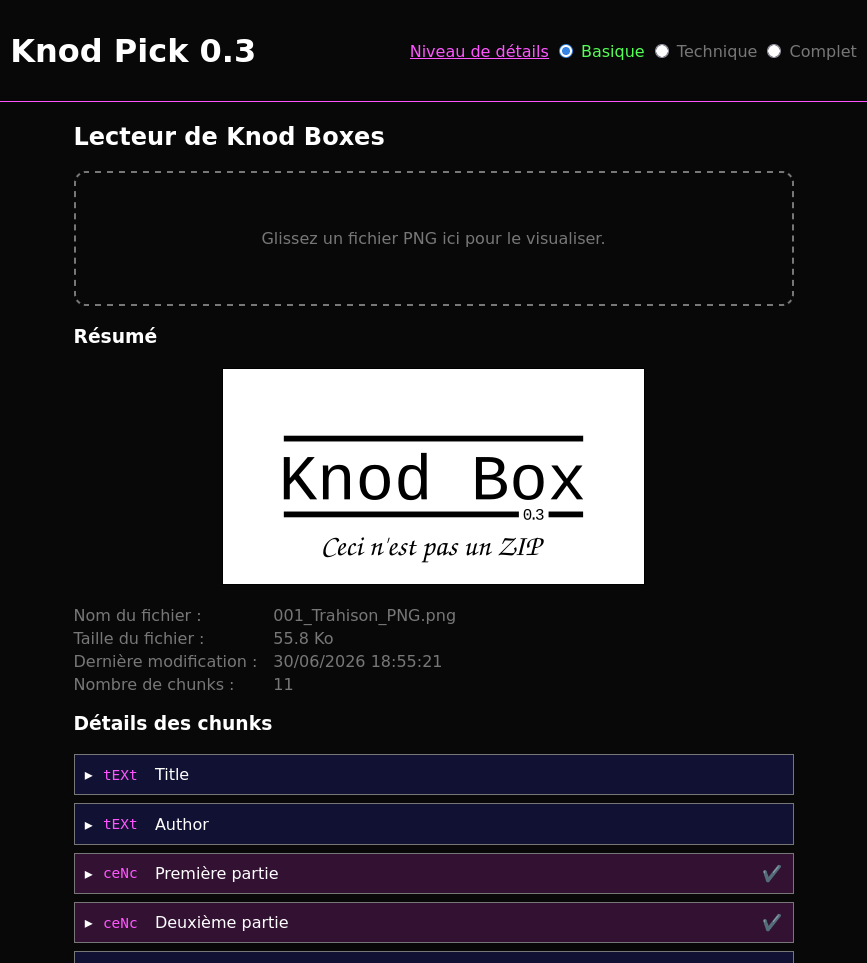
Scroll down to the bottom of the file, and the app will let you extract the ZIP and its hidden app from inside the PNG...
An Extended PNG
The great thing about the PNG format is that it's relatively easy to extend. The details are in the spec, but generally, once past the first 8 bytes that say "PNG Here", the rest is a series of chunks that all present themselves in the same way:
- The chunk's content size over 4 bytes (big-endian),
- The chunk type (4 alphabetical characters),
- The chunk data, the format depends on the type,
- The CRC-322 calculated over the type and data.
The specification defines essential chunk types for storing images (e.g. pixel colors) but leaves us free to define our own types as long as we respect a few constraints (basically, they can't be critical).
My custom chunks
So I defined a few of my own...
fiLe : which associates a filename with the file's contents. This turns the PNG into a file container. I can thus attach files to the puzzles. It's in one of these files that I embedded the ZIP containing the app.
ceNc : which stores a group of encrypted chunks that can be unlocked with a password (the solution to a puzzle) or a cryptographic key (obtained by solving other puzzles).
These chunks serve many purposes. Creating directories to group chunks by puzzle, storing useful info in case of a nearly correct answer from the player, marking an intermediate step in a puzzle...
csIg : which signs the preceding chunks and embeds the certificate of the signing key and its trust chain so the signature can be verified knowing only the root. I use it to certify the authenticity of my Knod Boxes.
knOd : which stores an encrypted cryptographic key, unlockable with a password (puzzle solution) or by another key. Most of the time, I use it to store a certificate's private key...
ceRt : which embeds a certificate and its trust chain. Find the private key for this certificate (hidden in a knod) and you can use it to sign your success badges...
kbDg : which represents success badges. It contains a player's message, their signature made with the key they found, as well as the certificate and its trust chain that allows verifying the badge's authenticity.
The crypto algos
The HTML+JS app is made to let you play without needing to understand anything about crypto, but for the curious, here's what I put inside...
PBKDF2 to derive keys from puzzle answers. It's more practical than SHA512 because I can play with the iteration count to hinder brute-force attacks. I would have liked to use Argon2, but it's not available in Vanilla JS.
AES-GCM to encrypt chunks (in cenc) or keys (in knod). The advantage is that this mode provides an authenticity check that will tell you if the provided answer is correct or not.
Ed25519 to sign chunks (in csig) and messages (in certificates and badges), and of course, to verify that these signatures are valid.
X25519 to generate shared secrets. I use it to encrypt contents intended for a public key. Readable only by players who have discovered the corresponding private key.
Other algorithms are defined, but here are the main ones; the ones I use the most.
What's next?
With PBKDF2 and AES-GCM, the app can verify the answers provided by players and unlock access to other chunks (via a cenc) or a cryptographic key (via a knod). With Ed25519 and certificates, discovering the private key allows you to craft a proof of success (a kbDg badge) without revealing the answer, and it's verifiable offline with this CA:
TGVzIGFyc291eWVzIFJvb3QgQ2VydGlmaWNhdGUA
UHUTjaCwC1tjtOwynMWTVZwH7YUUW8ZBxYyrkc3k
SN4DiFkgFNU8Yv75YOK0ESKeW8vfCbmKmK9dVPDj
S4s9/6ySv/x1ly9xy/+mhRLF8lz8t2vxcdUaeN8N
Lv49zp5bCw==
If you liked the introductory Knod Box, or if you want to see another type of puzzle that can be integrated into it, here is a second Knod Box:
Download this file to your hard drive, unzip the app (or reuse the one from the introductory Knod Box) and you'll be able to play with the Syracuse sequence, share your badges, and verify your friends'.
For the curious, and those who would like to develop their own tools, the ZIP I embed in the Knod Boxes contains, in addition to the Knod Pick, the format specification. You'll find all the details I thought to describe in there (data formats and algorithm descriptions)3.
Similarly, the JS code of the app is not minified. I wrote it so you could read and adapt it as needed. On the other hand, keep in mind that I learned to code in JS three weeks ago for the occasion4.
Final warning (and not the least), I'm still finalizing the format, so you should consider it in the testing phase. The Knod Pick in version 0.2 won't be able to understand version 0.3. And it's highly likely that 0.3 won't be fully compatible with 0.4 because I still have things to integrate. Don't hesitate to contact us if you want to be kept in the loop.
However, the badge format will not change, so they will remain verifiable. Please don't ever hesitate to share them ;-)
Edit of July 15th 2026. As I expected, I've made some changes in the format, the explanations are in the following article.